
+- PINE64 (https://forum.pine64.org)
+-- Forum: PinePhone Pro (https://forum.pine64.org/forumdisplay.php?fid=177)
+--- Forum: PinePhone Pro Hardware (https://forum.pine64.org/forumdisplay.php?fid=180)
+--- Thread: PinePhone Pro Explorer's edition Qualcomm modem recovery (/showthread.php?tid=19007)
Pages:
1
2
PinePhone Pro Explorer's edition Qualcomm modem recovery - shifras - 01-12-2024
Hi guys,
i really need help on my PPPro. I was recently trying to update my modem's firmware using gnome-firmware app using this instruction in the video "4 of 5": https://forum.pine64.org/showthread.php?tid=18209
Update failed to install, and now i ended up with non-bootable modem. I searched the PineWiki and found this emergency procedure designed to boot modem in to EDL mode by shorting the test points on the PinePhone, but when i removed the back cover i only found there is no simmilar pins, or at least i don't know which ones to use on my the explorerss edition phone. Also i used this Hardware test build from here: https://wiki.pine64.org/wiki/PinePhone_Pro#Factory_Test_Build_for_Hardware_Checking
and test fails for sim card. Also in Arch build it is not listed as /dev/ttyUSB2 or any ttyUSB. Seems it is bricked, and i need to enter EDL mode somehow. Is there any hope to revive the modem?
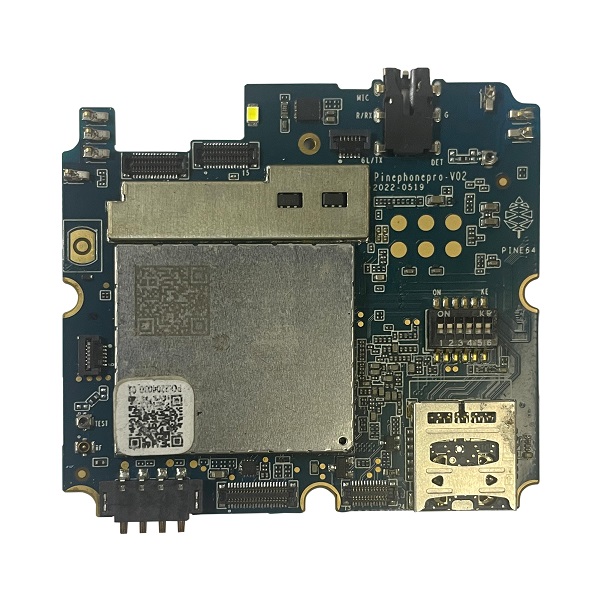
RE: PinePhone Pro Explorer's edition Qualcomm modem recovery - mikehenson - 01-16-2024
(01-12-2024, 01:49 PM)shifras Wrote: Hi guys,
i really need help on my PPPro. I was recently trying to update my modem's firmware using gnome-firmware app using this instruction in the video "4 of 5": https://forum.pine64.org/showthread.php?tid=18209
Update failed to install, and now i ended up with non-bootable modem.
In my video, It failed the first time, The phone would not let me restart. I had to load it again.
It looks like first time it installs a "Google" version 1. See video at 4:33
The second time it loaded and let me restart the phone.
RE: PinePhone Pro Explorer's edition Qualcomm modem recovery - shifras - 01-16-2024
[quote pid="121338" dateline="1705417407"]
In my video, It failed the first time, The phone would not let me restart. I had to load it again. It looks like first time it installs a "Google" version 1. See video at 4:33 The second time it loaded and let me restart the phone.
[/quote]
Yea, i know. Same happened to me. First time it failed. So i tried again, but instead of seeing success, it failed again. And qualcomm option dissapeared. Since then it is not listed in devices /dev/ directory. Also $ fwupdmgr get-devices does not list quectel modem. I am sure modem needs to be booted into EDL mode as in regular PP by shorting test points on the board, but on the pro i have no idea how to do that, because they are not marked.I opened a ticket in pine64 support. They instructed me to perform hardware test in their android build, which i did. Exported a test result and sent them. Second day still no answer as of yet. I will update of the progress, but i am actually very motivated to hear any suggestions up untill then since this can happen to anyone and would really be awesome to find a recovery solution.
RE: PinePhone Pro Explorer's edition Qualcomm modem recovery - mikehenson - 01-17-2024
(01-16-2024, 09:34 AM)shifras Wrote: Yea, i know. Same happened to me. First time it failed. So i tried again, but instead of seeing success, it failed again. And qualcomm option dissapeared. Since then it is not listed in devices /dev/ directory. Also $ fwupdmgr get-devices does not list quectel modem. I am sure modem needs to be booted into EDL mode as in regular PP by shorting test points on the board, but on the pro i have no idea how to do that, because they are not marked.I opened a ticket in pine64 support. They instructed me to perform hardware test in their android build, which i did. Exported a test result and sent them. Second day still no answer as of yet. I will update of the progress, but i am actually very motivated to hear any suggestions up untill then since this can happen to anyone and would really be awesome to find a recovery solution.
Here is my output of 'cd /dev/' and lsusb
Code:
[alarm@danctnix ~]$ cd /dev/
[alarm@danctnix dev]$ ls
autofs           fd         i2c-5        loop3         mmcblk1p1     port   ptyp8   shm       tty14  tty26  tty38  tty5   tty61  ttyp7    ttyUSB1       v4l-subdev3  vcs6   vcsu3    video5
block            full       i2c-9        loop4         mmcblk2       ppp    ptyp9   snapshot  tty15  tty27  tty39  tty50  tty62  ttyp8    ttyUSB2       v4l-subdev4  vcs7   vcsu4    video6
btrfs-control    fuse       iio:device0  loop5         mmcblk2boot0  psaux  ptypa   snd       tty16  tty28  tty4   tty51  tty63  ttyp9    ttyUSB3       v4l-subdev5  vcsa   vcsu5    video7
bus              gpiochip0  iio:device1  loop6         mmcblk2boot1  ptmx   ptypb   stderr    tty17  tty29  tty40  tty52  tty7   ttypa    uhid          v4l-subdev6  vcsa1  vcsu6    video8
cdc-wdm0         gpiochip1  iio:device2  loop7         mmcblk2p1     pts    ptypc   stdin     tty18  tty3   tty41  tty53  tty8   ttypb    uinput        v4l-subdev7  vcsa2  vcsu7    video9
char             gpiochip2  iio:device3  loop-control  mmcblk2p2     ptyp0  ptypd   stdout    tty19  tty30  tty42  tty54  tty9   ttypc    urandom       v4l-subdev8  vcsa3  vfio     zero
console          gpiochip3  input        mapper        mmcblk2rpmb   ptyp1  ptype   tty       tty2   tty31  tty43  tty55  ttyp0  ttypd    userfaultfd   v4l-subdev9  vcsa4  video0   zram0
core             gpiochip4  kmsg         media0        mqueue        ptyp2  ptypf   tty0      tty20  tty32  tty44  tty56  ttyp1  ttype    v4l           vcs          vcsa5  video1
cpu_dma_latency  hugepages  kvm          media1        mtd           ptyp3  random  tty1      tty21  tty33  tty45  tty57  ttyp2  ttypf    v4l-subdev0   vcs1         vcsa6  video10
cuse             i2c-0      log          media2        mtd0          ptyp4  rfkill  tty10     tty22  tty34  tty46  tty58  ttyp3  ttyS1    v4l-subdev1   vcs2         vcsa7  video11
disk             i2c-1      loop0        media3        mtd0ro        ptyp5  rtc     tty11     tty23  tty35  tty47  tty59  ttyp4  ttyS2    v4l-subdev10  vcs3         vcsu   video2
dri              i2c-3      loop1        mem           net           ptyp6  rtc0    tty12     tty24  tty36  tty48  tty6   ttyp5  ttyS3    v4l-subdev11  vcs4         vcsu1  video3
fb0              i2c-4      loop2        mmcblk1       null          ptyp7  serial  tty13     tty25  tty37  tty49  tty60  ttyp6  ttyUSB0  v4l-subdev2   vcs5         vcsu2  video4
[alarm@danctnix dev]$ lsusb
Bus 001 Device 001: ID 1d6b:0002 Linux Foundation 2.0 root hub
Bus 002 Device 001: ID 1d6b:0002 Linux Foundation 2.0 root hub
Bus 002 Device 003: ID 2c7c:0125 Quectel Wireless Solutions Co., Ltd. EC25 LTE modem
Bus 003 Device 001: ID 1d6b:0001 Linux Foundation 1.1 root hub
Bus 004 Device 001: ID 1d6b:0001 Linux Foundation 1.1 root hub
[alarm@danctnix dev]$
RE: PinePhone Pro Explorer's edition Qualcomm modem recovery - shifras - 01-18-2024
'Kay guys,
it seems i made it. Managed to get modem to work again (no connectivity though, need to install proper firmware anyway). The catch was to find the correct test points on my board to boot modem in to EDL mode, since they are unmarked and completely in different configuration than on the regular PinePhone. By analysing Quectel manual, board schematics and layout diagrams, i managed to find the correct test points to short. I must say, that this task is very inconvenient, because the test points are like 1mm in diameter and in opposite chip corners. Since i have tow-boot installed, i had to short these points with one hand while operate hardware buttons with other hand. The pins must be shorted all the way up until OS boots up completely. It was fun experience
 I am adding image with marked spots where the points are located on PinePhone Pro explorer's edition motherboard (upper point is actually at the top right corner of the chip on my motherboard).
P.s. special thanks to @mikehenson for independent validation and verification of the procedure, so i was able to be more confident to perform it succesfully.
P.p.s the points are in a slightly different location on my ppp. Top point is on the top/right corner of the modem rf shield, and available to reach.
RE: PinePhone Pro Explorer's edition Qualcomm modem recovery - 0x715C - 02-04-2024
Could you please share the image again, the previous link has expired.
RE: PinePhone Pro Explorer's edition Qualcomm modem recovery - james8880 - 03-24-2024
(01-18-2024, 03:36 PM)shifras Wrote: 'Kay guys,
it seems i made it. Managed to get modem to work again (no connectivity though, need to install proper firmware anyway). The catch was to find the correct test points on my board to boot modem in to EDL mode, since they are unmarked and completely in different configuration than on the regular PinePhone. By analysing Quectel manual, board schematics and layout diagrams, i managed to find the correct test points to short. I must say, that this task is very inconvenient, because the test points are like 1mm in diameter and in opposite chip corners. Since i have tow-boot installed, i had to short these points with one hand while operate hardware buttons with other hand. The pins must be shorted all the way up until OS boots up completely. It was fun experience
P.s. special thanks to @mikehenson for independent validation and verification of the procedure, so i was able to be more confident to perform it succesfully.
P.p.s the points are in a slightly different location on my ppp. Top point is on the top/right corner of the modem rf shield, and available to reach.
Can you post back an image of higher resolution of the board? I cannot read some of the labels. I understand if you cannot but I hope that there is one.
RE: PinePhone Pro Explorer's edition Qualcomm modem recovery - zetabeta - 03-24-2024
(03-24-2024, 10:12 AM)james8880 Wrote:(01-18-2024, 03:36 PM)shifras Wrote: 'Kay guys,
it seems i made it. Managed to get modem to work again (no connectivity though, need to install proper firmware anyway). The catch was to find the correct test points on my board to boot modem in to EDL mode, since they are unmarked and completely in different configuration than on the regular PinePhone. By analysing Quectel manual, board schematics and layout diagrams, i managed to find the correct test points to short. I must say, that this task is very inconvenient, because the test points are like 1mm in diameter and in opposite chip corners. Since i have tow-boot installed, i had to short these points with one hand while operate hardware buttons with other hand. The pins must be shorted all the way up until OS boots up completely. It was fun experience
P.s. special thanks to @mikehenson for independent validation and verification of the procedure, so i was able to be more confident to perform it succesfully.
P.p.s the points are in a slightly different location on my ppp. Top point is on the top/right corner of the modem rf shield, and available to reach.
Can you post back an image of higher resolution of the board? I cannot read some of the labels. I understand if you cannot but I hope that there is one.
i don't think you need (new) high-resolution pictures.
https://files.pine64.org/doc/PinePhonePro/PinephonePro_PCB_Component_Placement-V02_20211127-bottom.pdf
https://wiki.pine64.org/wiki/PinePhone_Pro#Datasheets,_schematics_and_certifications
labels seems to be:
up: T6503
down: T6504
RE: PinePhone Pro Explorer's edition Qualcomm modem recovery - tensa1000 - 01-08-2025
Hello guys,
it seem I have the same problem, by trying to play with my modem, I assumed getting into edl should be easy seeing the pictures, until I understood the ppp does things quite differently.
You ( @shifras ) fixed your problem. Could you please share a picture of the backsite of the phone which testpoint you used. From the image and the technical drawing I can't seem to find the right testpoint (T6503) seems be drawen between the two metal cans.
thanks
RE: PinePhone Pro Explorer's edition Qualcomm modem recovery - biketool - 01-09-2025
This is the answer to nearly all modem problems.
https://themodemdistro.com/efs_recovery
As long as you can get some access to the modem you do not need to short pins or open the phone. Remember to use sudo su to get a root shell rather then running the ADB, modemdistro scripts, and fastboot with sudo which often doesn't work.
Recovery of the EFS area
So, you're probably here because your modem suddenly stopped booting after a failed firmware ugrade or downgrade.
Long story short: something changed in the way Quectel builds their images and it seems like if you got a new board and attempt to flash an older image version the modem will stop being able to read its own EFS area and end up in offline mode with no IMEI.
Since most forum posts send everyone to the git we still have these problems because themodemdistro gid doesn't have any easy links to themodemdistro website where all of the good information is found. Someone please update pine64 and mobian wikis as I have lost access.